
- 98% Approval
- 14,000+ Visas Delivered
- 24 Hours Fastest Processing
- 256-bit SSL Secured
Status check
How to check your Turkey eVisa status.
One-time code to your inbox. No login, no password. Under 2 minutes from email to status.
Step by step
Check your Turkey eVisa status in 3 steps.
Have your application email handy. That is all you need.
Open the status check page
Visit turkvisas.com/check-status from any phone, tablet, or laptop browser. No app to install. Nothing to download.
Bookmark this link. It is the only page you need to track any application you have ever submitted with us.
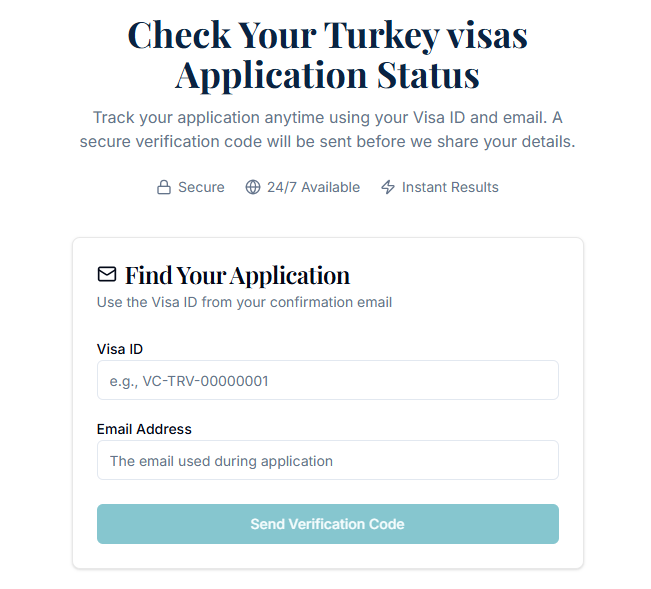
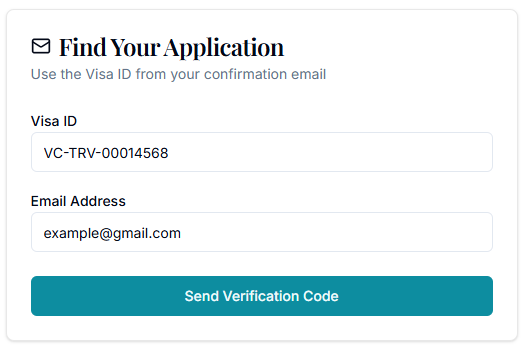
Find your application with Visa ID and email
Enter the Visa ID from your confirmation email plus the email address you applied with, then tap Send Verification Code. A 6-digit one-time code lands in your inbox within seconds.
Cannot see it? Check spam or promotions. Personal Gmail, Outlook, Yahoo, or local Indian/Pakistani/Mexican providers usually get the code fastest. Corporate mail servers sometimes filter transactional email.
Enter the code, see your status
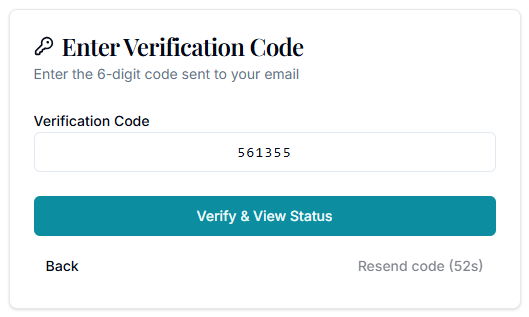
Type the 6-digit code on the page. You go straight to your application, where you can see live status, download your approved eVisa, and retrieve your invoice.
Each code is single-use and expires in 10 minutes. Closed the page? Just request a fresh code, no reset needed.
From one page
What you can do on your status page.
Once verified, every action lives in one place.
See current status
Pending Review, In Review, On Hold, Approved, or Refused. Always live, refreshed in real time.
Download your eVisa
Once approved, the PDF is ready to download. The eVisa is also linked electronically to your passport in the Turkish system.
Retrieve your invoice
Download a PDF invoice for personal records or to claim back from your employer for business travel.
Contact support
Email or message our team on WhatsApp from the same page. Email replies within 4 business hours.
Status labels and what they mean
Pending Review
Just submitted. Our team will pick it up shortly.
In Review
A real person is checking your passport details and form answers. For Tier 2 applicants, also validating the qualifying visa.
Documents Re-review
Something needs a fix (often a passport detail or qualifying visa). We message you on WhatsApp with what to update.
On Hold
Paused by the Turkish immigration authorities for a routine verification.
In Process
Submitted to the Turkish e-Visa system. Waiting on the official decision.
Approved
Your eVisa is issued and electronically linked to your passport. Ready to travel.
Refused
Application not approved. We explain why and advise on the next step (reapply or sticker visa).
Cancelled
Cancelled before submission. Refund handled per our Refund Policy.
Quick answers
Status check FAQs.
Top questions, in plain language. Full FAQ on the FAQ page.
No. We use a one-time code sent to the email address you applied with. There is no account to create, no password to remember, and nothing to reset. Each code is valid for 10 minutes and is single-use, which keeps your application data safer than a permanent login would.
Your Visa ID is the reference number we issue the moment your payment is confirmed. It looks like VC-TRV-00014568 and appears in the subject line and first paragraph of your order confirmation email from inq@turkvisas.com. If you cannot find that email, search your inbox for "Turk Visa" or "TRV-2026". Still nothing? Email us with the full name and date of birth on the passport you applied with and we will look it up.
First, check your spam, promotions, and updates folders. Then confirm you entered the same email you used when applying (typos in gmail vs gmial are the most common cause). Wait 60 seconds and tap Resend code on the page. If it still does not arrive, your corporate mail server may be filtering transactional email, in which case use a personal Gmail, Outlook, or Yahoo address by contacting our support team to update the email on file.
In real time. The status you see on the page is the same status our application team and the Turkish e-Visa system see. When a status changes, the page reflects it within seconds. You will also receive an email notification at each major step (In Review, In Process, Approved, or Refused), so you do not need to keep refreshing the page.
Not necessarily. Express applications typically move from In Review to In Process within 4 to 12 business hours. Tier 2 Conditional applicants (India, Pakistan, Bangladesh, Philippines, Sri Lanka, Nepal, Egypt and others) often spend a little longer in this state because our team validates the qualifying Schengen, US, UK, or Ireland visa before submission. If we need anything from you, we move the status to Documents Re-review and message you on WhatsApp and email with the exact fix.
Yes, as long as they have access to the email inbox the application was submitted with and the Visa ID from the confirmation email. The one-time code is delivered to that inbox, so anyone with both pieces can view the application. If you applied for a group (family, tour, or business team), every member's status is visible from a single login when the same email is on file.
Yes. The status page is permanent. Use it any time before or after travel to re-download your eVisa PDF, retrieve your invoice for expense claims, or confirm that your eVisa is still linked to the passport you intend to travel on. There is no time limit and no extra charge to access your approved application.
Email inq@turkvisas.com with the full name and date of birth on the passport you applied with. Replies arrive within 4 business hours, faster during business hours in Asia. For urgent travel within 48 hours, message us on WhatsApp using the number in your confirmation email and flag the message as urgent.
Ready when you are
Check your application status now.
Have your application email handy. One-time code, no login, under 2 minutes to live status.